No confidential upload
Contracts, applications, records, and scanned documents stay on your Mac.
 NeatClick
Private PDF compression
Pick a size limit from Finder and let NeatClick make a smaller PDF on your Mac, ready to email or upload.
Version 1.2 · Requires macOS 14 or later. · No subscription · Files stay on your Mac
How it works
Choose an unlocked PDF in Finder.
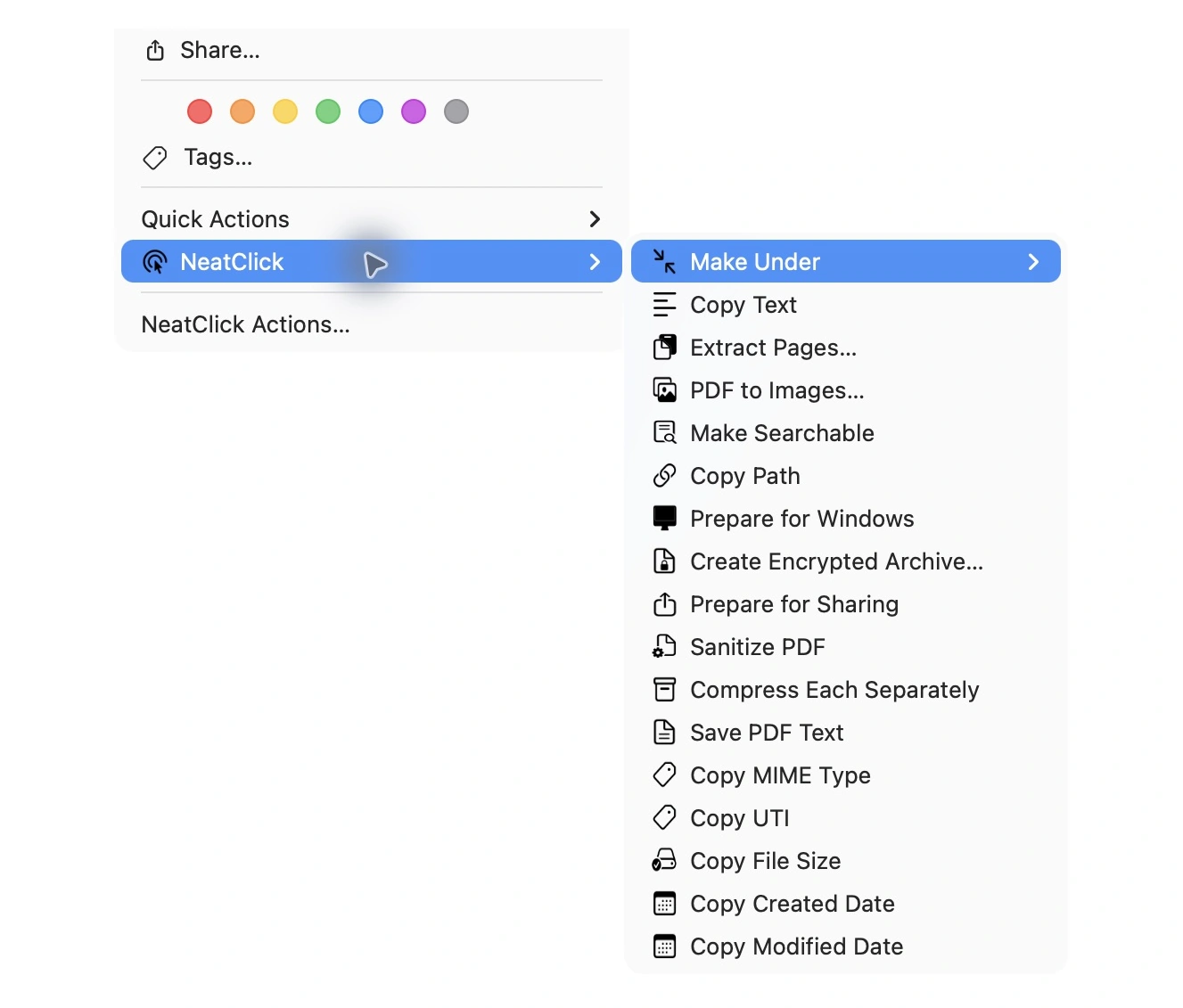
Choose NeatClick → Make Under and select 1, 2, 5, 10 MB, or a custom target.
NeatClick checks the finished size and saves the new PDF. Your original stays in place.
Why NeatClick
Contracts, applications, records, and scanned documents stay on your Mac.
Start with the size required by the destination instead of repeatedly guessing export quality.
NeatClick does not turn every page into an image just to make the PDF smaller.
Extract pages, combine PDFs, export pages as images, run OCR, extract text, or sanitize a document.
What is included
Questions
Choose Make Under → 5 MB. For a form that requires strictly less than 5 MB, use Custom Value… and enter 4.8 MB to leave a little room.
NeatClick preserves text and vector content where possible instead of flattening every page into an image.
No. PDF processing runs locally on your Mac.
Keep working

More than 80 local file actions. One purchase for two Macs.